Explainer
How ads in Google AI Overviews work
Ads can sit above, below or inside a Google AI Overview. How each position is filled, which campaigns qualify, and what 1,917 US ads showed in Oct 2026.
By the AI Overview Ad Library team · Published · Updated · 8 min read
In short
- Google says ads can appear above, below or within an AI Overview: above and below in all 200+ markets that have AI Overviews, within only for English searches in 12 countries.
- There is no AI Overview campaign. You can’t target the placement or opt out of it; the ads come from campaigns you already run: Search, Shopping and Performance Max, plus App campaigns for the positions above and below.
- Google Ads reports ads in AI Overviews as top ads and has no separate segment for them, so their results are mixed into your ordinary Search numbers.
- In our ad capture (searches run in a browser, where the ads on the page are recorded), 133 of 149 short searches showed an AI Overview and 111 showed ads (Oct 10–11, 2026, US searches). Of the 1,538 ads we could place, 64% are filed above the AI Overview and 36% below it; this edition does not record a position inside the AI Overview.
On this page · 8 sections
Three places an ad can sit
An AI Overview is the summary Google’s AI writes at the top of some results pages, with links to the pages it drew on. It does not replace the ads on the page; it moves in among them. Google’s help page for advertisers describes three positions an ad can take relative to it: above it, below it, or inside it.
| Position | Where Google offers it | Which ads | In our capture |
|---|---|---|---|
| Above the AI Overview | All 200+ markets where AI Overviews appear | Existing text, Shopping, local and app ads | 991 ads on 76 pages |
| Below the AI Overview | All 200+ markets where AI Overviews appear | The same | 547 ads on 101 pages |
| Inside the AI Overview | English searches on mobile and desktop in 12 countries, including the US | Text and Shopping ads from Search, Shopping and Performance Max campaigns | Not recorded as a separate position; such ads, where we could place them, are filed as below |
The twelve countries for ads inside AI Overviews are Australia, Canada, India, Indonesia, Kenya, Malaysia, New Zealand, Nigeria, Pakistan, the Philippines, Singapore and the US. When Google began rolling out AI Overviews to everyone in the US on May 14, 2024, it said ads would “continue to appear in dedicated slots throughout the page”. Ads inside AI Overviews reached US mobile users on Oct 3, 2024 and US desktop on May 21, 2025, and Google’s review of 2025 said they had since “expanded to desktop and more countries globally”. In October 2025 Google began grouping text ads under a single “Sponsored results” header, which it said can be found “above or below AI Overviews.”
How the ads are chosen
Google’s answers on control are short: “No, you can’t opt out of serving ads in AI Overviews” and “No, you can’t directly target ad placements in the AI Overviews.” Whether you appear is decided by the ordinary Search auction and, for the position inside, one extra test.
- Above and below. These are the normal ad positions on a results page, filled by Ad Rank. Google lists six inputs: your bid, the quality of the ad and landing page, minimum thresholds, how close competing ads are, the context of the search (terms, location, device) and the expected effect of assets. Only ads that clear the threshold for the “top ad location (generally above search results)” show there; the rest go to “ad locations lower down the page”. Google does not say how those groups line up with the AI Overview; it says only that it “uses existing signals and systems” to decide whether ads show above, below or within it.
- Inside. Google says “both the user query as well as the content of the AI Overview are considered when serving these ads”, and that the ads “must additionally be relevant to the content of the AI Overviews”.
- Excluded topics. Google says it does not currently show ads in AI Overviews for “sensitive verticals like adult, alcohol, gambling, finance, healthcare, politics, and more”. The rule is written for the position inside; ads above and below are ordinary Search ads, under Google Ads’ usual policies for each category.
For the position inside, Google says it requires broad match or keywordless targeting, naming AI Max for Search, Performance Max, Shopping campaigns and Dynamic Search Ads, and it recommends Smart Bidding alongside them. That list is shifting. In April 2026 Google said Dynamic Search Ads, automatically created assets and the campaign-level broad match setting would all be upgraded to AI Max from September 2026. A June 11, 2026 update kept September for the last two but moved the start of the Dynamic Search Ads upgrade to February 2027.
How they show up in your reports
Google Ads does not tell you when an ad ran inside an AI Overview. Its help page says “ads in AI Overviews are reported as Top Ads” and that it “currently doesn’t offer segmented reporting when ads show within Search AI Overviews.” Those impressions and clicks land in the same top ads figures as any other ad at the top of the page, including the Impr. (Top) % and Impr. (Abs. Top) % metrics.
Retailers have one report that names AI Overviews, though it leaves ads out. Merchant Center’s AI performance insights lets a store compare its visibility with competitors’ on conversational shopping searches that trigger AI Overviews or AI Mode (English queries; accounts in the US, Canada, Australia, India and New Zealand). Google says the data is limited to organic traffic such as free listings and that paid ads are not included. Other ways to track the placement are in measuring ads around AI Overviews.
What we saw on 138 results pages
We ran 528 signed-out Google searches from US connections on Oct 10 and 11, 2026, in two captures. Our ad capture is 149 short searches run in a browser, where the ads on the page are recorded: an AI Overview appeared on 133 of them (89%) and ads on 111 (74%). Our answer capture is a second set of 379 searches that recorded the AI answer and the sources it linked, but picked up ads on few of them (29 of 379); an AI Overview appeared on 366 of them (97%). The library keeps the ads of 138 of the 140 pages that showed ads: 1,917 ads from 691 advertisers, 356 text ads and 1,561 product listings. The methodology explains how we place each ad against the AI Overview.
Our records file each ad as above or below the start of the AI Overview, so they cannot say how many sat inside it. On some saved pages a block labelled “Sponsored” sits directly under the AI Overview’s text; where we could place its ads, they are counted as below. The split is approximate: on 4 saved pages most of the placed ads are filed on the wrong side, as the methodology explains. Of the 112 pages we could place, 65 have ads filed on both sides, 36 only below and 11 only above. Counting both captures, a page with ads held a median of 5.5 ads, but product searches pulled the average up: 28 pages carried 30 or more ads, and 1,124 of their 1,168 ads were product listings. Three pages show the range:
- Is an ERP worth it for a 20 person company. The AI Overview opened by saying an ERP system “is generally not worth it for a standard 20-person company” outside complex, high-compliance industries. Above it, NetSuite ran “Calculate ERP ROI”. Below it came Acumatica with “Best ERP for Small Business”, SelectHub, NetSuite again and Sage with “ERP That Closes 90% Faster”. The ads and the answer did not have to agree.
- Cabin tent. Thirty-nine product listings from 19 stores sat above the AI Overview and nothing sat below it. Walmart and KingCampOfficial had five listings each, and prices ran from $109.99 at Target to $2,249 at Competitive Edge Products.
- Best way to get good seats for a playoff game that just sold out. A longer question, with four ticket sellers in the space above: StubHub, Ticketmaster, SeatGeek and Gametime. Five more followed below, from StubHub (twice), SeatGeek, TickPick and Ticketmaster. The AI Overview itself advised using “verified secondary marketplaces”.
The patterns behind these pages are covered in ads above vs below AI Overviews and which searches show AI Overviews and ads. Every figure is on the statistics page, and the pages themselves are in the examples.
What this means for your account
- Check what is already eligible. Ads above and below an AI Overview come from campaigns you run now. For the position inside, Google says it requires broad match or keywordless targeting (AI Max, Performance Max, Shopping or Dynamic Search Ads), so a Search campaign with only exact and phrase match keywords can reach only the positions above and below. How to get ads around AI Overviews walks through each setup.
- Read your ads next to the answer. Someone who reaches an ad below the AI Overview has just read a summary of the topic. Search your main terms signed out, or test your copy in the ad preview, and ask whether the ad adds something the answer did not.
- Watch the top-ad metrics. Because ads inside AI Overviews count as top ads, a shift in Impr. (Top) % or in top-of-page click-through rate on terms that now show an AI Overview is the closest signal Google Ads gives you.
- Keep the product feed current. Google’s advice for Shopping ads here is to make sure “feeds are kept up to date with the latest product information.” Listings made up 895 of the 991 ads we saw above AI Overviews.
- Know who else appears. The brand check looks a brand or domain up in this library, and alerts email you when we publish new ads in your industry.
Examples from the library
4 of the ads on searches this guide links to, in our capture (Oct 10–11, 2026, US searches). Each card shows the search that brought it.
 NetSuiteSponsored
Calculate ERP ROI
Trapped by Legacy ERP? Use real-time dashboards to track daily cash and manage entities in one ERP.
 StubHubSponsored
Last-Minute Tickets | Buy Now
Seamless E-Transfer — Compare Prices on the Worlds Largest Ticket Marketplace.
Above the AI Overview
Media & EntertainmentOct 10, 2026 $270Product
KingCamp MOUNTAIN IN C5 5-Person Cabin Tent with Stove Jack & AC Port Green
Above the AI Overview
Searched for
Sports, Outdoor & FitnessOct 11, 2026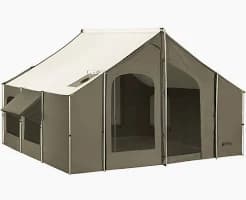 $999.99Product
12x12 Cabin Lodge Camping Canvas Tent (SR) by Kodiak Canvas
Above the AI Overview
Searched for
Sports, Outdoor & FitnessOct 11, 2026


Questions and answers
Can I opt out of ads in Google AI Overviews?
No. Google’s help page says advertisers can’t opt out of serving ads in AI Overviews and can’t target the placement directly. Ads above and below come from your existing Search, Shopping, Performance Max and App campaigns; ads inside, from Search, Shopping and Performance Max.
Do ads appear inside AI Overviews in the US?
Google says text and Shopping ads are eligible inside AI Overviews for English searches in the US and 11 other countries. Our capture of 138 US results pages (Oct 10–11, 2026) files every ad we could place as above or below the start of the AI Overview. It does not record an inside position, so it cannot say how many sat inside. On some saved pages a block labelled “Sponsored” sits directly under the AI Overview’s text; where we could place its ads, they are counted as below.
How are ads in AI Overviews reported in Google Ads?
As top ads. Google Ads currently has no segment that separates impressions or clicks inside AI Overviews from other ads at the top of the page.
Which campaigns can show ads around AI Overviews?
Above or below: existing text, Shopping, local and app ads from Search, Shopping, Performance Max and App campaigns. Inside: text and Shopping ads from Search, Shopping and Performance Max campaigns, and Google says it requires broad match or keywordless targeting, such as AI Max, to match ads there.
Do finance or healthcare ads appear in AI Overviews?
Google says it currently doesn’t show ads inside AI Overviews for sensitive verticals including finance and healthcare. Ads above and below can still run, subject to Google Ads’ normal policies for these categories. We recorded 23 personal finance ads and 9 insurance ads on results pages with an AI Overview; this edition does not record an inside position.
Sources
- About ads and AI Overviews – Google Ads Helpsupport.google.com
- Generative AI in Search: Let Google do the searching for youblog.google · May 14, 2024
- New ways for marketers to reach customers with AI Overviews and Lensblog.google · Oct 3, 2024
- More opportunities for your business on Google Searchblog.google · May 21, 2025
- We’re improving navigation and introducing a new control for ads on Google Searchblog.google · Oct 13, 2025
- Google Ads Highlights of 2025 – Google Ads Helpsupport.google.com · Dec 8, 2025
- About Ad Rank – Google Ads Helpsupport.google.com
- We’re upgrading Dynamic Search Ads to AI Max (updated June 11, 2026)blog.google · Apr 15, 2026
- About AI performance insights – Google Merchant Center Helpsupport.google.com
- Methodology – AI Overview Ad Libraryaioverviewadlibrary.com
Figures from the library are in our capture (Oct 10–11, 2026, US searches) and describe what we observed, not Google’s full ad inventory. See how the ads are captured. AI Overview Ad Library is independent and not affiliated with Google.